
Scheduled checking
Run recurring checks without waiting for somebody to open the dashboard.
Page Content Guard add-on
When important content should be checked even on days nobody opens WordPress
If a monitor depends on somebody remembering to run it, the check is easiest to miss on the day it matters. PRO runs recurring checks, emails selected recipients when issues open or resolve, and keeps a usable record of what happened.
Stay with FREE while manual checks are enough. Add PRO when the site needs automation, off-dashboard notification, incident history, stronger stored-value checks or bulk work.
PRO 1.7.1 is a separate add-on. Page Content Guard FREE 2.3.1 or a compatible newer release must be installed and active.
On this page
What you are paying for
Your existing FREE monitors stay where they are. PRO does not replace them or move you into a second monitoring system.
It adds the parts that earn their keep once checking by hand becomes another task that can be delayed, forgotten or repeated across too many pages.
Run recurring checks without waiting for somebody to open the dashboard.
Tell selected people when an issue opens or resolves.
Bring back problems that were noticed but still have not been fixed.
See when a problem began, ended and returned later.
Detect exact changes to stored post_content, excerpts and featured-image assignments.
Catch staging text, temporary notices or other wording that should have been removed.
Stop repeating the same setup and maintenance action one monitor at a time.
See useful scheduler, history and mail-attempt state without exposing monitored content.
Updates are downloaded manually from Gumroad while the subscription remains active.
When nobody opens WordPress
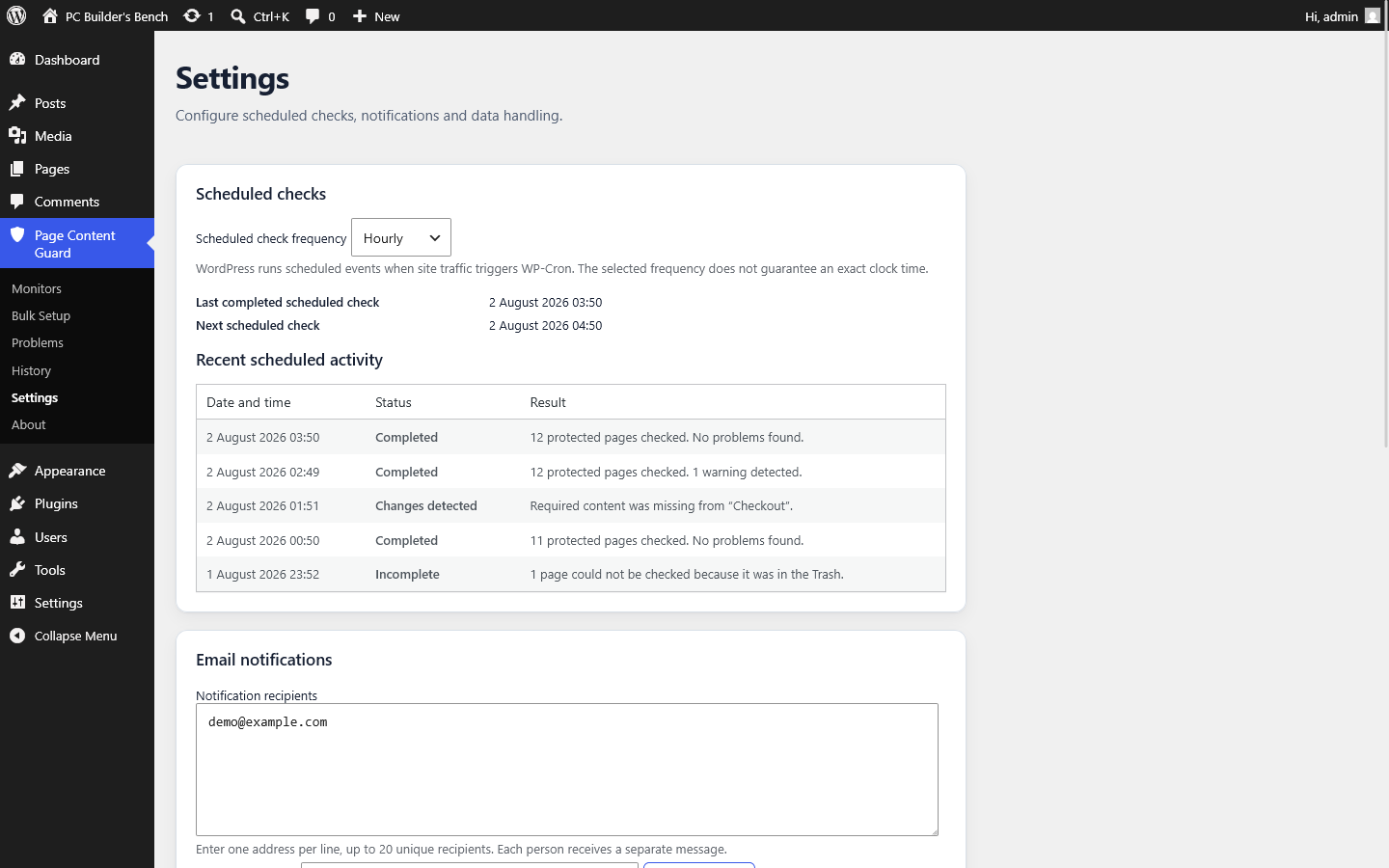
If the site goes several days without an administrator visit, a manual check simply does not happen. PRO can run checks hourly, twice daily, daily or weekly.
Scheduled work is split into bounded batches rather than trying to load an unlimited monitor set into one request. The dashboard and Site Health diagnostics show the latest completed run, the next scheduled event and relevant machine-readable failure state.
One limitation matters before you rely on this: scheduled checks use WordPress Cron.
The selected frequency is a recurrence interval, not an appointment time. WP-Cron runs when traffic or an external cron request triggers it, so a low-traffic site may run late. A site with DISABLE_WP_CRON enabled needs its own external request to wp-cron.php or an equivalent WP-CLI cron command.
Private notifications
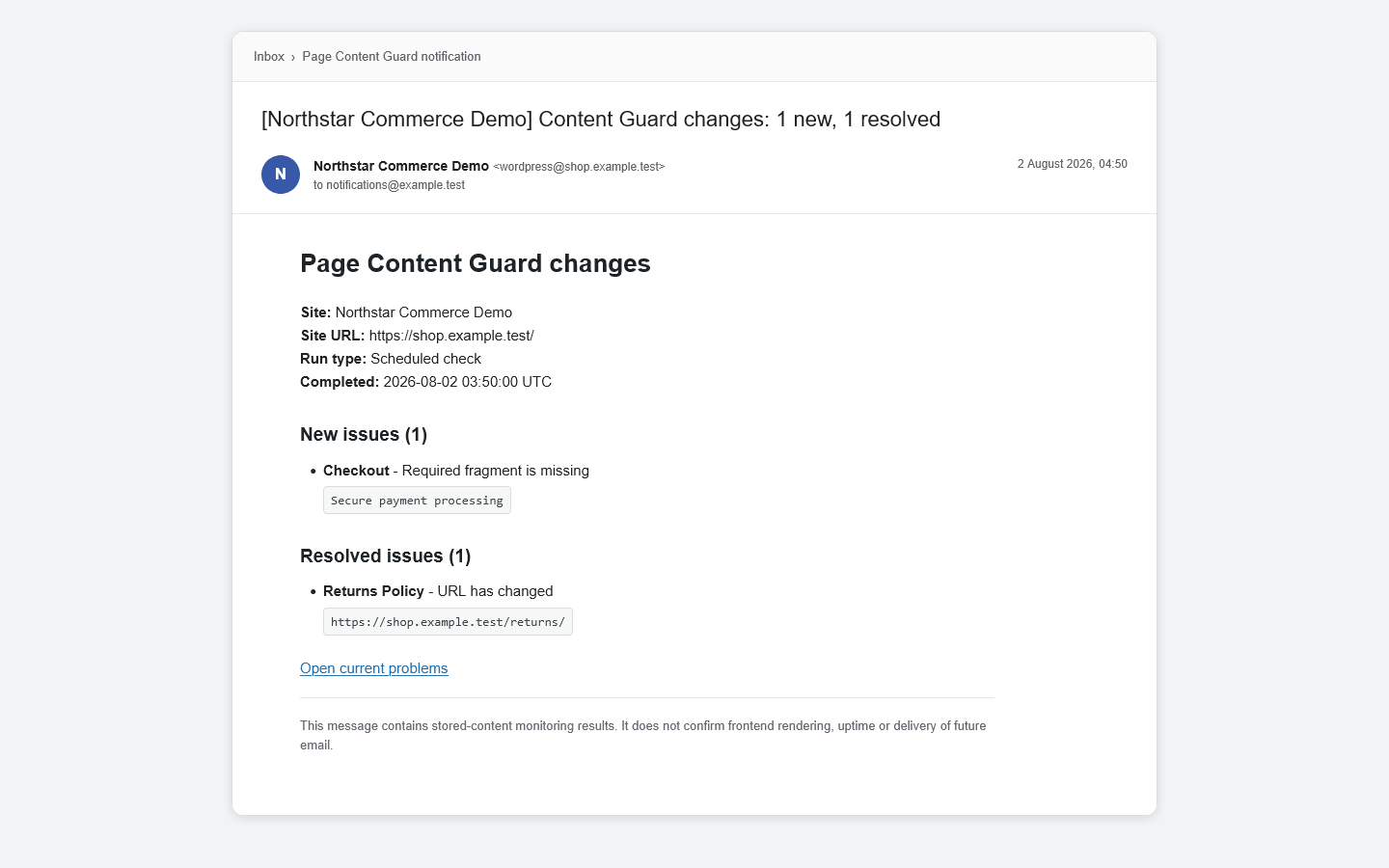
A dashboard warning helps only after somebody looks at the dashboard. PRO can send a private summary after a completed check run when an issue opens or resolves.
An unchanged, continuing issue does not generate the same transition message over and over. If one run contains both new and resolved issues, PRO combines them into one summary for each recipient.
You can configure up to 20 unique recipient addresses. Each message is sent separately, so the complete recipient list is not exposed.
The recipient gets enough context to decide what to do next:
Messages use a plain, readable structure with relevant issue details and administration links.
Still-open issues
An issue can be noticed on Monday and still be sitting there on Friday. PRO can send optional daily or weekly reminders for incidents that remain open.
Reminders are evaluated after completed scheduled checks, so they inherit the same WordPress Cron timing limits.
When a scheduled run has both transitions and a due reminder, PRO combines them so each recipient receives at most one message for that completion.
Reminders are opt-in.
Recorded context
Current Problems tells you what is wrong now. That is not enough when you need to know how long the issue remained unresolved or whether the same failure keeps returning.
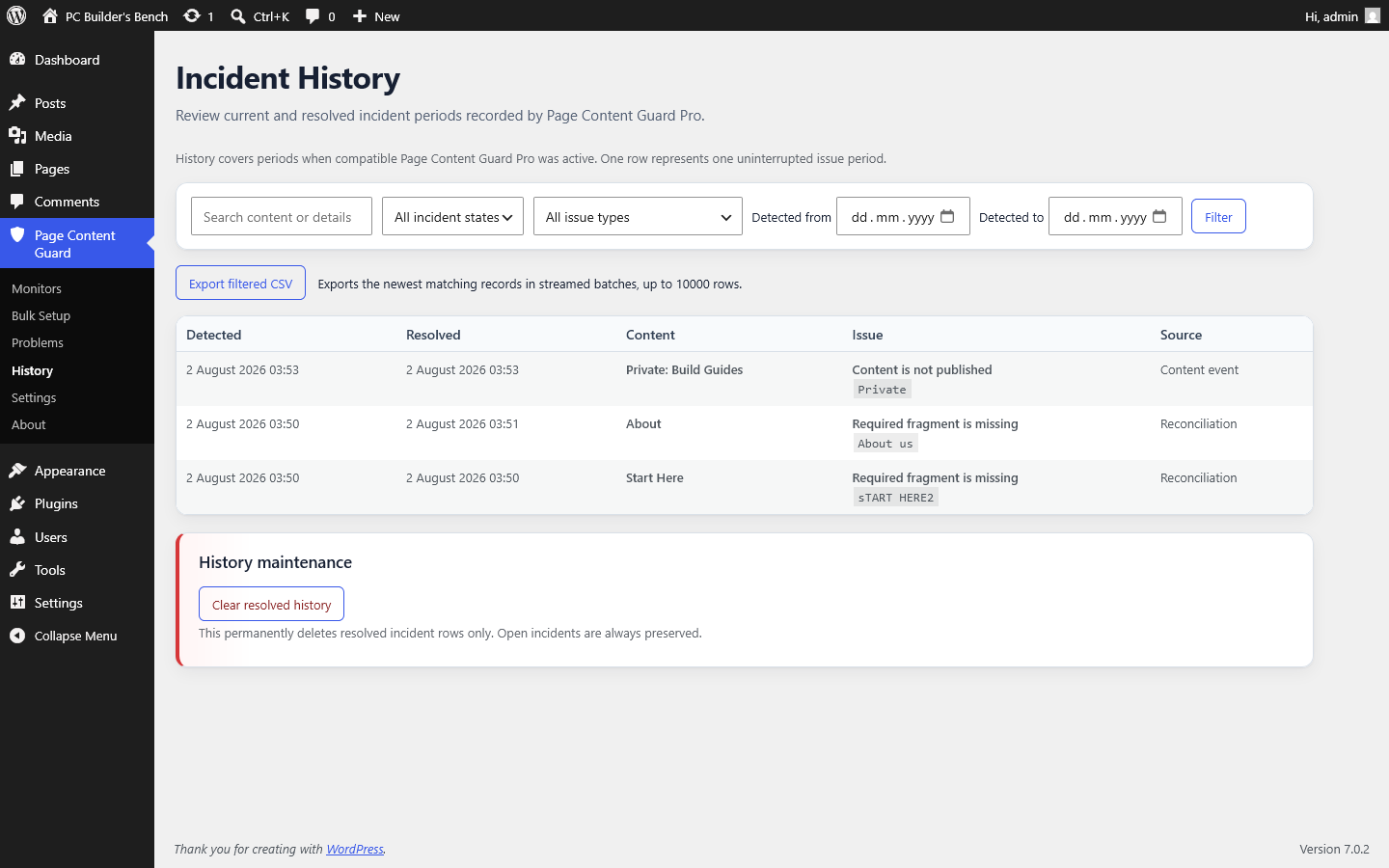
Incident History records one row for each uninterrupted issue period while a compatible PRO version is active.
If a problem remains unchanged through repeated checks, it stays one incident. When it resolves, that row receives a resolution time. If the same issue returns later, a new incident opens.
History can be searched and filtered by status, type and date. It is paginated and does not load every record into memory.
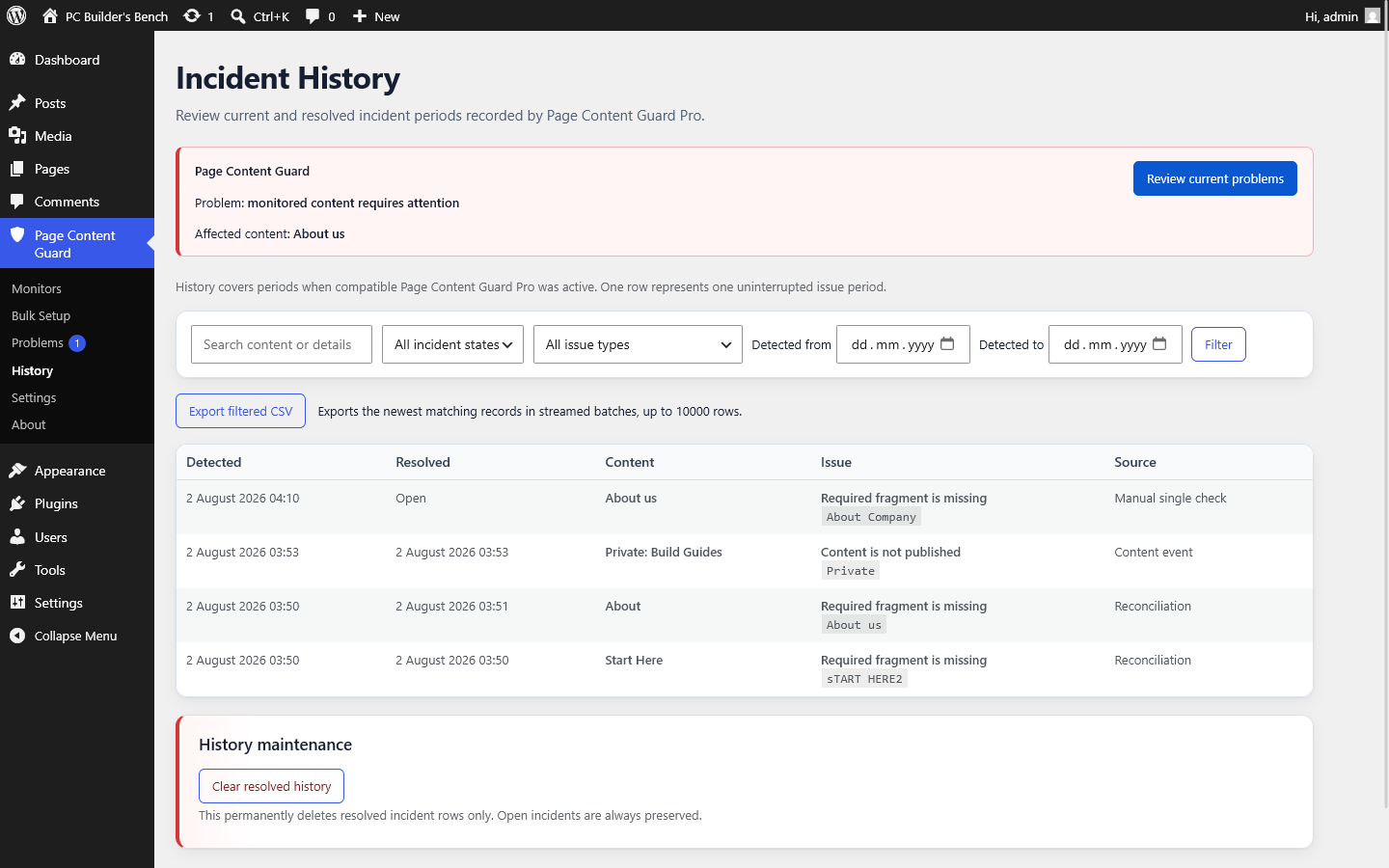
The currently filtered History view can be exported as UTF-8 CSV.
Exports are streamed in batches and include at most the newest 10,000 matching rows. Spreadsheet-formula protection is applied to exported values.
History retention is optional. The default is to keep resolved incidents forever. You can instead choose 30, 90, 180 or 365 days.
Open incidents are never removed automatically.
Retention runs through WordPress Cron and deletes at most 500 old resolved rows per UTC day. A large backlog can therefore take several days to clear.
When presence is not enough
Sometimes a page can still exist, stay published and contain the required wording, yet an important stored value has changed. FREE can monitor the exact stored title; PRO extends that baseline model to other supported values.
These are exact database comparisons. They do not decide whether the new content is better or worse, and they do not compare the rendered design.
post_content integrityPRO records a SHA-256 fingerprint of the accepted standard post_content value rather than copying the full content into the baseline.
A later exact-value change can open a stored-content integrity problem. Normal editing, imports or block-serialization changes can trigger it even when the visible result looks similar.
Where WordPress revisions still exist and the current user has permission, the problem can include a link to the native revisions screen for context.
For content types that support excerpts, PRO can record the accepted stored excerpt and report a later exact change.
A small display snapshot may be retained to make the problem understandable. The check does not judge whether the new excerpt is better or worse.
For content types that support featured images, PRO can record the accepted attachment assignment and report when it changes or is removed.
This checks the WordPress attachment ID. It does not compare image pixels, crops, generated sizes or visual presentation.
An approved edit should not force you to delete and rebuild the monitor.
Each supported integrity problem has an explicit action to accept the current value as the new baseline. Accepting one field does not overwrite unrelated baselines.
Ordinary monitor saves do not silently update active integrity baselines.
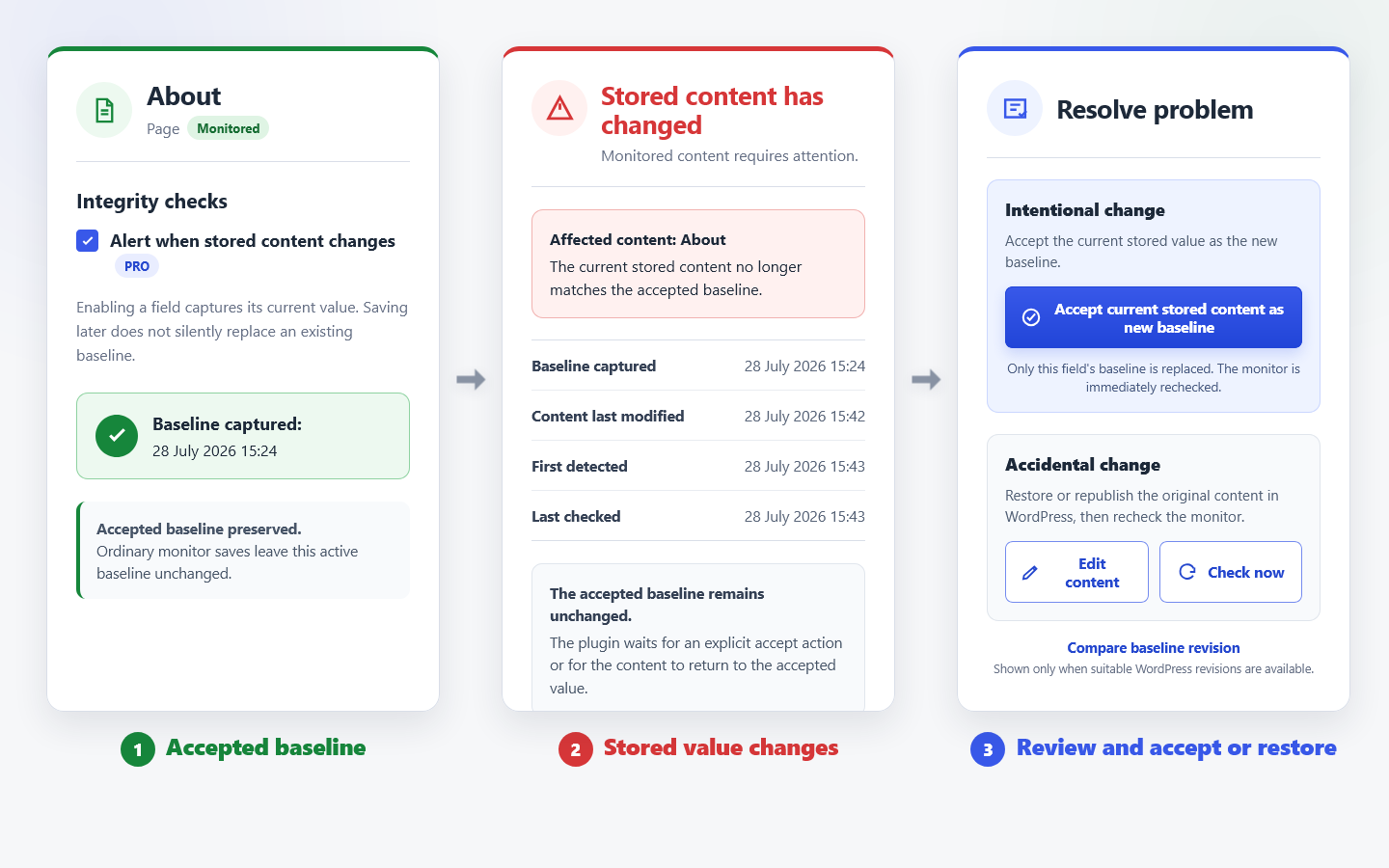
The opposite rule
Required fragments report when something expected is missing.
Forbidden fragments do the opposite. They report when selected text appears in standard post_content.
This is useful for temporary notices, staging wording, placeholder text, unwanted shortcodes or phrases that should not remain in published content.
The rule is literal. It does not interpret context or meaning, and it does not inspect builder-specific fields outside standard post_content.
Larger monitor sets
One monitor is quick. Repeating the same setup across dozens of pages is not a good use of anyone’s time.
Bulk Setup can create monitors for up to 100 selected published items in one run, processed in batches of 25.
You can use safe defaults or copy enabled checks and fragment values from one existing monitor. Target URLs, rule identifiers and integrity baselines are generated for each selected item rather than copied blindly.
If the source monitor changes while a multi-request setup run is in progress, the later batches stop instead of silently using a mixed configuration.
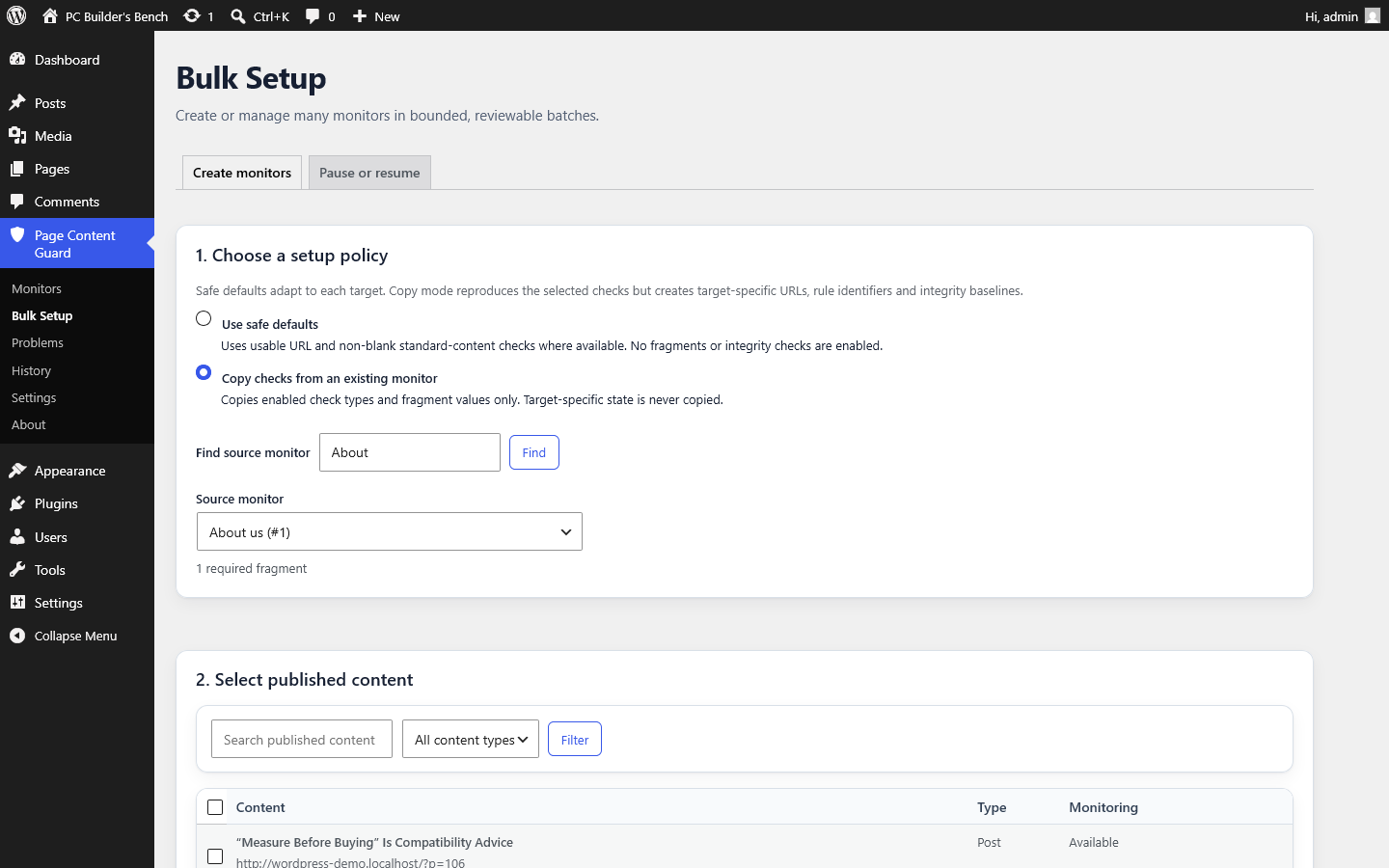
PRO can pause or resume up to 100 selected monitors in a bounded operation.
Pausing does not delete monitor configuration, current issues or history. Resuming returns the monitor to normal checking.
This is useful during planned content work, imports or a site migration where temporary changes would otherwise create noise.
A site migration or deliberate permalink restructure can change many expected URLs at once.
After verifying the new environment, PRO can accept current URLs for a bounded set of URL problems. The action is confirmed and processed as a controlled migration workflow.
Do not use it as a shortcut before checking that the new URLs are actually correct.
When automation fails
Cron, mail and history problems are often environmental. PRO adds privacy-safe Site Health and dashboard information for:
The diagnostic output avoids recipient addresses, titles, URLs, content fragments, issue details, hashes and record IDs.
I would rather give support a useful technical state than ask you to post a database dump or private page content. That is why these diagnostics are deliberately narrow and privacy-safe.
PRO makes sense when one or more of these are true:
post_content, excerpt or featured-image assignments matterIf you are comfortable checking manually, relevant changes happen through normal WordPress edits and you only need the current problem state, FREE already does the job.
FREE has no monitor or required-fragment quota. PRO should be bought for its paid behaviour, not to unlock an artificial capacity limit.
Return to the FREE overviewChoose by the work you need removed
The core monitoring model stays in FREE. PRO adds automation, notification, history, deeper baselines and bounded tools for larger sets.
| Capability | FREE | PRO |
|---|---|---|
| Active monitor limit | Unlimited | Unlimited |
| Required fragment limit | Unlimited valid fragments | Unlimited valid fragments |
| Checks after relevant content changes | Yes | Yes |
| Manual checks | Yes | Yes |
| Current Problems | Yes | Yes |
| Title baseline | Yes | Yes |
| Native revision links where available | Yes | Yes |
| Scheduled checks | Not included | Hourly, twice daily, daily or weekly |
| Transition email summaries | Not included | Yes |
| Open-issue reminders | Not included | Daily or weekly, optional |
| Incident History | Not included | Yes |
| CSV history export | Not included | Up to 10,000 newest matching rows |
| Resolved-history retention | Not included | Forever, 30, 90, 180 or 365 days |
Exact standard post_content baseline | Not included | Yes |
| Excerpt baseline | Not included | Yes |
| Featured-image assignment baseline | Not included | Yes |
| Forbidden fragments | Not included | Yes |
| Bulk Setup | Not included | Up to 100 items, batches of 25 |
| Bulk Pause or Resume | Not included | Up to 100 selected monitors |
| Accept All Current URLs | Not included | Yes |
| Automatic PRO updater | No | No |
Check this first
Page Content Guard PRO 1.7.1 requires:
Network-wide Multisite activation is not supported. Activate FREE and PRO separately on each intended site.
When FREE is missing, inactive or incompatible, PRO remains inert and shows one administrator notice.
Installation
Updates
There is no licence server or automatic PRO updater. While the subscription remains active, download each newer package from Gumroad and replace the installed plugin through WordPress.
A normal overwrite update preserves monitor data, PRO settings and incident history.
Page Content Guard PRO still checks WordPress records and stored database values. Paying for PRO does not change that boundary.
It does not:
Exact integrity baselines compare stored values. A harmless edit, import or WordPress block-serialization change can therefore open an issue.
CSV exports are capped at the newest 10,000 matching rows.
A finite retention policy may need several days to clear a large resolved-history backlog.
Deactivating PRO stops its scheduling and paid behaviour but preserves PRO settings, forbidden rules, integrity baselines and history.
FREE continues monitoring every non-paused monitor and required fragment.
PRO data is also preserved when PRO is uninstalled. Complete deletion is controlled by the explicit cleanup preference in Page Content Guard FREE and occurs only when FREE is deleted with that preference enabled.
Support and updates
Customer support is provided through the product's Gumroad Community while the subscription remains active. Open the product from your Gumroad receipt or Library, then choose Community.
Updates published through Gumroad are included while the subscription remains active. There is no guaranteed response time, managed service or promise of frequent feature releases.
Before posting, use the Diagnostics and Troubleshooting pages and include the relevant version numbers and machine error code. Community discussions are visible to other eligible customers, so do not post passwords, database exports, private monitored content or personal information.
Do not post suspected security vulnerabilities in the Community. Report them privately to [email protected].
Open Troubleshooting Open Page Content Guard PRO on GumroadBefore buying
Yes. PRO is an add-on. Compatible FREE must remain installed and active.
No. When a newer package is available, download the ZIP from the Gumroad receipt or library and replace the existing plugin through WordPress.
No. All non-paused monitors and required fragments continue in FREE. PRO-owned data is preserved but paid behaviour stops.
Not completely. Existing history is preserved. When PRO returns, open rows are reconciled against current issues during later checks, but a problem that appeared and resolved entirely while PRO was inactive cannot be reconstructed.
The check compares exact stored values. Imports, editing and block-serialization changes can alter the stored value even when the public result looks similar.
No. They depend on WordPress Cron and may run late on low-traffic sites unless an external cron trigger is configured.
No. It means WordPress accepted the message for sending. The hosting and mail setup still determine delivery.
Pay for saved work
Your existing FREE monitors stay in place. Install PRO beside them, then enable only the scheduling, email, history, integrity and bulk features the site genuinely needs.